伏せてから提出。
Redact first.
Then submit.
マイナンバーや免許証番号を自動で見つけて、復元できない形で黒塗り。本人確認書類を「提出してよい状態」にする、完全ローカルの Mac/iPhone アプリです。写真が外に送られることは、ありません。
Fuseo finds My Number and licence numbers in photos of Japanese ID documents and redacts them irreversibly — entirely on your device. Nothing ever leaves your machine.
brew install --cask supergodak/tap/fuseo
全機能無料・広告なし / オープンソース(MIT) / macOS 14+ / Apple公証済み
All features free, no ads · Open source (MIT) · macOS 14+ · Notarized
📱 iPhone版(無料)も公開中 — App Store でダウンロード
📱 The free iPhone version is out — get it on the App Store (Japanese & English UI)
※番号・氏名は架空です。黒塗りは画像に焼き込まれ、元に戻せません。
All values are fictitious. Redactions are burned into the pixels — irreversible.
道具がひとつ消えたこと。A default tool went away.
2025年、定番のスキャンアプリ Microsoft Lens が役目を終えました。紙をきれいに電子化する道具がひとつ減った一方で、本人確認書類を写真で提出する場面はむしろ増えています。
そして提出でいちばん怖いのは、画質でも影でもなく——見せなくていい番号まで、一緒に送ってしまうこと。マーカーで塗ったのに透けて見えた、という事故は珍しくありません。Fuseo はその一点のために作った、「黒塗りから始まる」スキャナです。
In 2025, Microsoft Lens — many people's default scanning app — was retired. Meanwhile, being asked to submit photos of your ID keeps getting more common.
The scariest part of submitting isn't image quality. It's sending numbers you never needed to show — like the classic accident of marker-pen redactions that turn out to be see-through. Fuseo is a scanner that starts from redaction.
3つのあんしん。Three guarantees.
完全ローカル
Local only
処理はすべて Mac の中だけで完結。写真も検出結果も外部に送信されません。アカウントもテレメトリもありません。仕組みはオープンソースで、誰でも検証できます。
Everything runs on your Mac. No uploads, no account, no telemetry. The code is open for anyone to verify.
復元できない黒塗り
Irreversible redaction
黒塗りは画像そのものを塗りつぶす「焼き込み」方式。透けたり、レイヤーを剥がされたりしません。撮影日時などのメタデータも引き継ぎません。
Redactions replace the pixels themselves. Nothing shows through, nothing can be peeled off. Metadata such as EXIF is never carried over.
書き出す前に、必ず確認
You always confirm
自動検出は「候補」の提示です。どこを塗るかの最終判断は、書き出す前に必ずあなたが行います。各候補には塗る根拠も表示します。
Detection only proposes candidates. You make the final call before anything is saved — with the legal or practical basis shown for each mask.
目で見て保存する。Review, then export.
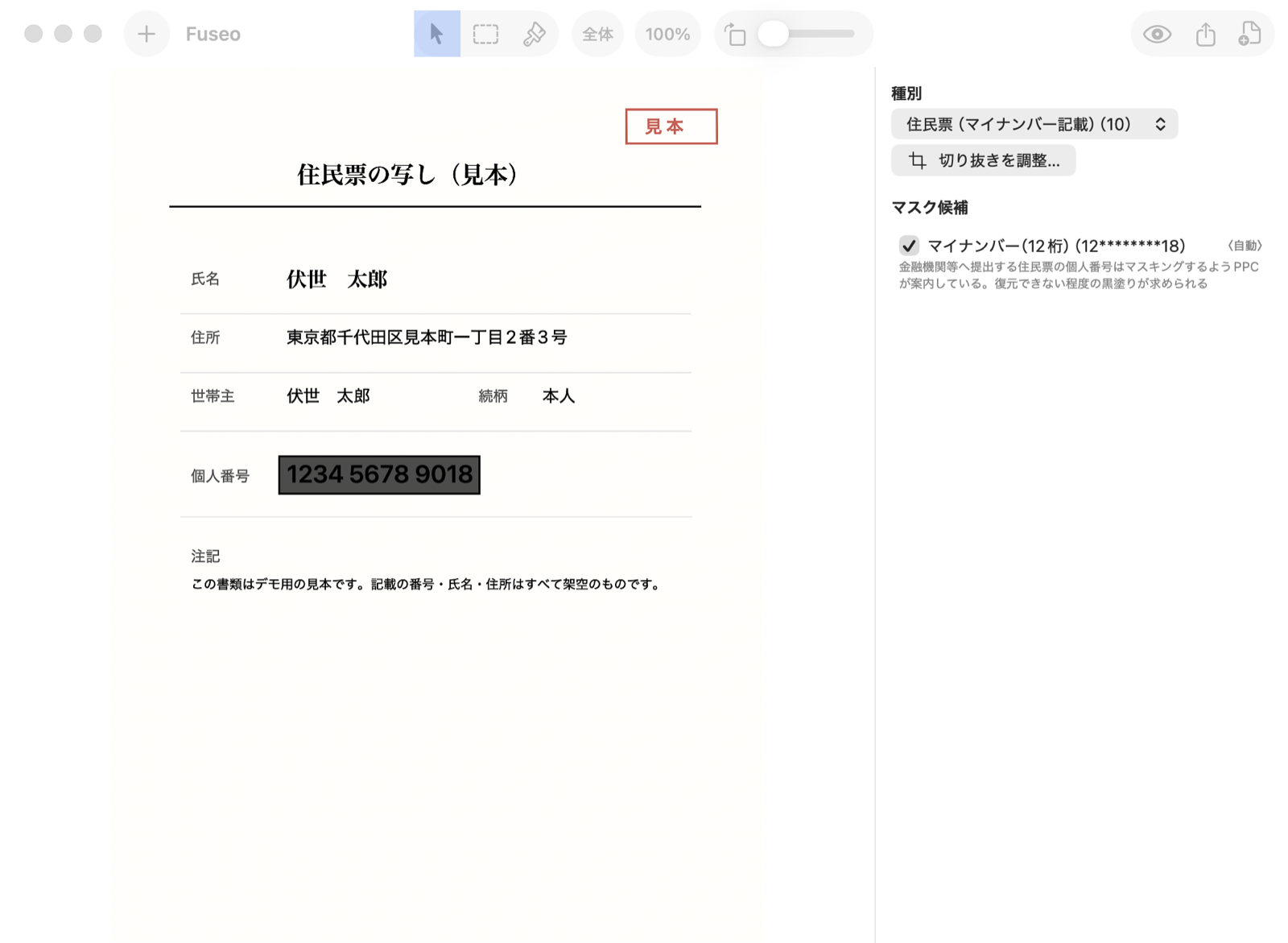
確認画面:見本書類のマイナンバーを自動検出し、根拠つきで候補表示(記載の番号・氏名はすべて架空です)
The review screen: a sample document with its My Number detected and proposed for redaction, basis included. All values fictitious.
これらは自動認識。Supported documents.
それ以外の書類でも自動検出は働きます——契約書・申込書・領収書などどんな書類でも、写り込んだマイナンバー(12桁・検査用数字で検証)/クレジットカード番号/QRコード・バーコード/顔写真を自動でマスク候補にします。自動候補が出ない箇所は、手動の矩形・ブラシで自由に塗れます。傾いた写真は四隅の手動指定や回転で直せます。フォルダごとの一括取込にも対応——束で放り込んで一覧で確認し、「元のファイル名-masked」でまとめて書き出せます。
Auto-detection works on any document — contracts, application forms, receipts: My Number digits (check-digit verified), credit card numbers, QR/barcodes and faces that appear anywhere are flagged automatically. For anything else, draw rectangles or brush strokes by hand, fix the crop corners, rotate as needed. Batch mode included: drop a whole folder, review everything in a grid, export one masked file per document.
フォルダごと一括処理。Handle the whole stack.
不動産の契約、入社の手続き、士業の窓口——本人確認書類は、1枚ではなく束でやってきます。Fuseo はフォルダごと受け取り、全書類を自動で解析して一覧に並べます。どれが何の書類で、マスクがいくつ付いたか、マスクの無い要注意の書類はどれかまで、ひと目で分かります。
解析はおおむね1枚1秒。あなたの仕事は、一覧を目で確かめることだけ。確認を終えたら、書類ごとに「元のファイル名-masked」で一括書き出しできます。
Real-estate contracts, onboarding paperwork, professional practices — ID documents arrive in stacks, not one at a time. Drop a whole folder on Fuseo: every document is analyzed and laid out in a grid, showing what each one is, how many masks it got, and which ones have none and need your attention.
Analysis takes about a second per document. Your job is just to look. Then export the whole batch, one masked file per document.
中の画像をまとめて取込。切り抜き・傾き・向きの補正も自動です。
Everything inside is imported, cropped, deskewed and oriented automatically.
種別とマスク数を一覧表示。気になる書類はクリックして個別に調整。
See type and mask count at a glance; click any document to adjust it.
保存先を選ぶだけ。各書類が「元名-masked」で個別ファイルになります。
Pick a folder — each document is saved as its own masked file.
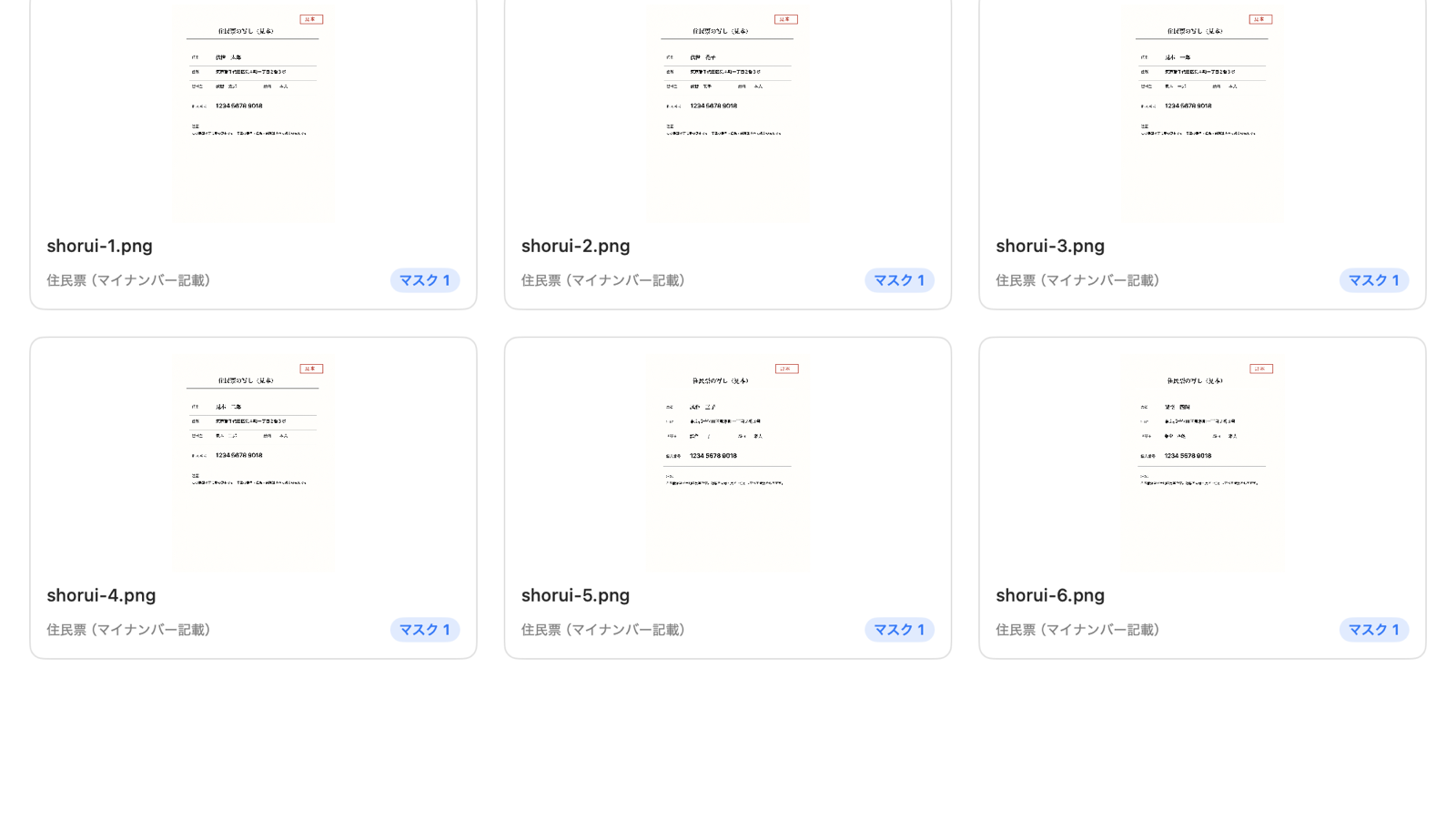
一覧レビュー:フォルダ取込した見本書類6枚。種別・マスク数を一覧で確認できます(記載内容はすべて架空です)
Batch review: six sample documents imported from a folder, with type and mask count per document. All values fictitious.
ふつうのスキャナとして。Also just a scanner.
黒塗りが要らない書類にも、そのまま使えます。領収書、契約書、手書きのメモ——写真を放り込めば、切り抜き・傾き補正・影除去まで自動。白黒(文書)モードならスキャナの文書コピーのようにくっきり仕上がり、検索可能PDF(OCR内蔵)なら中の文字を後から検索できます。
しかも黒塗り屋のスキャナなので、スキャン中も見張りは働きます。書類に写り込んだクレジットカード番号・マイナンバー・QRコード・顔写真を自動で検出してマスク候補に挙げます。「スキャンして送ったら番号まで写っていた」を仕組みで防げます。
No redaction needed? Use it as a plain scanner. Receipts, contracts, handwritten notes — drop a photo and get auto-crop, deskew and shadow removal. Black-and-white mode gives crisp document copies; searchable PDF embeds an OCR text layer.
And because it's a redaction tool at heart, it keeps watch while you scan: credit card numbers, My Number digits, QR codes and faces that sneak into the shot are detected and flagged — so you never mail out a scan with a card number in the corner.
※検索可能PDFのテキスト層に、黒塗りした部分の文字は含めません。
The OCR text layer never includes text under a redaction.
※PDF は各ページを画像として処理します(黒塗りの下の文字は残りません)。ページの中に小さく写ったカードは自動で切り抜きます。作業は自動保存され、「作業中の書類」からいつでも再開できます(端末内のみ・iCloud バックアップ対象外)。
PDF pages are processed as images (nothing under a redaction survives); a small card inside a page is cropped automatically. Your work is saved automatically and can be resumed from "Documents in progress" (on this device only, excluded from iCloud backup).
提出前には、これだけ確認。Before you submit.
提出前に確認してほしいこと
Before you submit
- 自動検出は完璧ではありません。塗り漏れの最終確認はご自身でお願いします。
- 原本の保存が義務づけられている書類(扶養控除等申告書など)は、黒塗りコピーで代替できません。
- マイナンバーカードの裏面は、そもそも提出が求められているかを提出先にご確認ください。
- Automatic detection is not perfect. Always check for missed spots yourself before submitting.
- Documents that must be kept in original form cannot be replaced by a redacted copy.
- For the back of a My Number Card, first confirm whether submitting it is even required.
しっかり伏せて、さくっと提出。
Redact right. Submit with confidence.
brew install --cask supergodak/tap/fuseo
全機能無料・広告なし・アカウント不要 / macOS 14(Sonoma)以降 / Apple Silicon・Intel / Apple公証済み
iPhone版(無料)も公開中——App Store でダウンロード。撮ってその場で伏せられるほか、控除証明書などの PDF もメールや「ファイル」の共有メニューから直接開けます(1 回につき 10 ページまで/それより長い書類は Mac 版へ)。
All features free, no ads, no account · macOS 14 (Sonoma)+ · Apple Silicon & Intel · Notarized
The free iPhone version is also out — download it on the App Store. Shoot and redact on the spot, or open a PDF straight from Mail or the Files share sheet (up to 10 pages per import; use the Mac app for longer documents). Fully localized in English.